
Area Calculator
The Area Calculator lets you measure the area of any location by drawing directly on an interactive map. Click to place points around the boundary of your chosen region, and the tool will calculate the enclosed area instantly in square meters, square kilometers, acres, hectares, and square feet. It's ideal for estimating the size of land parcels, fields, or other irregular shapes. The tool also shows the perimeter of the area and offers options to customize markers and fill colours. You can save or export your results for reference, making it a practical tool for many uses.
Measure an Area
Area Output
Perimeter Output
Options
Read KML
Instructions
To use the area calculator tool:
- Zoom and pan the map to find the area of interest
- Click on the map to place a vertices for the polyline
- Click as many time as necessary to define the polyline
The area enclosed will them be output in square meters and square kilometers
You can click the [Delete Last Point] button if you make a mistake or click [Clear All] points to remove all points from the map and start again.
You can also reposition the markers after they have been placed on the map by dragging and dropping them.
To draw a new area click the [Start a New Area] button or press Alt+n
Information
The area calculator tool allows you to find out the area that is enclosed inside a closed polyline overlaid on a map.
Benchmarks
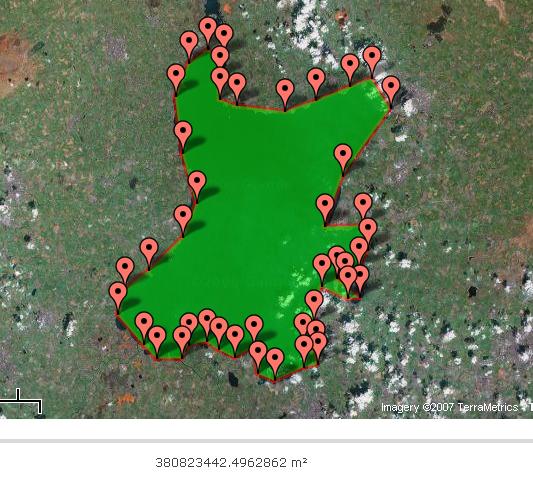
A measurement of Lough Neagh in Northern Ireland. Lough Neagh is reported to have a surface area of 388 km² [1] , so the reading of 380 823 442m² isn't far off.
Future Uses and Ideas
- Allow the user to change the colour of the polylines and area shading (including transparent)
- Allow the area to be saved for later use
- Export to KML option
Version History
- 17th June 2015 - Markers now show their lat/lng when you hover over them
- 18th December 2014 - Total area is now calculated
- 23rd March 2014 - Added Hectares output
- 6th August 2013 - Issue with perimeter output fixed
- 21st February 2013 - Added square feet output
- 8th January 2012 - Upgraded to Google Maps API V3 and some new features
- 20th July 2010 - Added crosshairs and option to switch on/off crosshairs
- 17th June 2010 - Added upload KML option (beta)
- 2nd June 2010 - Moved the scale control to the top of map to stop conflict with Google Search bar
- 2nd February 2010 - Added perimeter output in meters and kilometers
- 25th March 2008 - Draggable markers, ability to click inside polygon and output in acres added
- 26th June 2007 - Basic area calculation added
- 24th June 2007 - Page created
Comments
Great tool, but what happened to the ability to switch between metric and imperial measurements? Frustrating that I have to convert everything now.
In a future revision, I would like to see distance between points on the perimeter.
Utterly useless now. Ease of use and functionality ruined. It's free to use but not worth the money!
very useful application. Gives almost correct area if you know your approximate boundary points. Great Thanks.
Good
Great work on creating such an useful tool
Amazing tool. Thanks for providing it for free!
Super helpful, great site, thanks :)
Very helpful
very helpful
Nice and very useful
You have no idea how much this page has helped me in multiple occassion. Numerous times. Generous features.
Very helpful tool. Thank you
awesome tool
hello, any way this could have an addition option to type in an external co-ordinate/waypoint? ..as part of the area drawn
best tool for area and elevation measurement
thank you team
great tool
Paris France
Great Site tool
Showing the most recent 20 of 1453 comments. See all comments.