
Find Population on Map
Estimate the population within a custom-defined area on a map. By drawing a shape, selecting a radius, or inputting coordinates, users can calculate how many people live within that boundary. The tool uses population data overlays to provide real-time estimates, making it useful for planning, analysis, or research purposes. It's ideal for both personal and professional geographic population insights.
Get Started
You can search by a location name and radius, OR choose the circle / polygon icon on the toolbar and start drawing your area.
Inputs
Loading Map
Map Options
Output
Instructions
- Search, zoom and pan the map to find the desired location
- Toggle the Polygon or Radius draw tool by clicking on the icon on the toolbar on the map
- Click on the map to define the outside edge of the polygon. You can move the edges after it has been drawn. You can delete an edge by right clicking
- Once the area is defined, click the [Find Population] button to find the population inside
- After a delay, the estimated population is returned and displayed below the map
Other notes:
- Click the [Full Screen] icon on the map to view the map in full screen
- Click the [Zoom To Fit] button to zoom your map in/out on the area drawn
- Click the [Reset Map] button to start again
Data
Population data is from 2015,2020 & 2025 (estimated)
Example Population Estimate
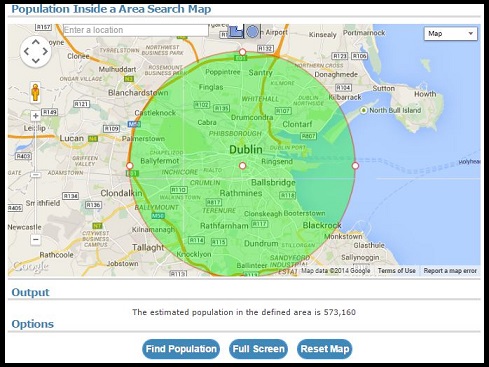
Screenshot of radius population estimate for Dublin, Republic of Ireland
Version History
- 27th May 2026 : Version 5.7 - Improved error handling
- 21st April 2026 : Version 5.6 - More updates to saving and loading functionality
- 19th April 2026 : Version 5.5 - Updates to saving and loading functionality
- 13th October 2025 : Version 5.4 - Population data for 2023 added
- 17th May 2025 : Version 5.3 - UI Updates
- 21st April 2025 : Version 5.2 - Location autosuggest stopped working. Alternative now in place
- 14th June 2024 : Version 5.1 - Performance Improvements
- 27th January 2024 : Version 5.0 - New option to specify epoch (year) of data
- 9th January 2023 : Version 4.2 - Improvements to drawing radius manually
- 6th November 2022 : Version 4.1 - Polygon search added
- 5th November 2022 : Version 4.0 - Up and running again with radius search
- 2nd October 2019 : Version 3.1 - Adding nodes to polygon no longer causes map to re-zoom
- 15th October 2018 : Version 3.0 - Converted to Leaflet maps
- 22nd March 2015 : Version 2.3 - Radius can now be drawn with a manual radius and location
- 15th January 2015 : Version 2.2 - Now displays circle radius in miles as well as km
- 8th November 2014 : Version 2.1 - Added Zoom to Fit button
- 15th July 2014 : Version 2 - Added radius circle search for population
- 15th July 2014 : Version 1.1 - Polygon Search now works clockwise and anticlockwise
- 28th June 2014 : Version 1 - Initial Version. Polygon Search
Comments
Please add an option to key in coordinates, that'll make it so much easier!
It just keeps saying "please wait" even after like 10 mins
City names are not auto populating
I keep getting zero for population estimate
I get 0 as estimated population, how come?
Legit, yes. Accurate, subjective, but treat it as an estimate.
it this legit ? and accurate
Bob, what size is the shape? There are "too small" and "too large" scenarios that will produce no results.
I keep getting error;no results when I make my own shape
Justin R, it should be working again
The auto-complete on city names is no longer working
Why doesnt 2020 work?
IMPORTANT NOTE: For those of you getting "The estimated population in the radius is 0"... to "fix"/help this issue, just make the radius of the circle to SMALLER than 70km^2 at a time. Sometimes it works for bigger radiuses, but often it doesn't; also, if your circle goes across multiple different countries, it can also mess up the tool. Hope this helps!
cool app i like the idea very much but it is SO SLOW and laggy takes way too long plus when i finally outlined my area and pressed find population i waited for like 5 minutes and it just said "please wait" the whole time and never loaded
This is great. Just what I need for a study that I am doing around certain population centers.
This is fantastic. Just what I need for a study of populations related to trails around the centers of certain cities that I am doing. Thank you.
It is still showing Zero for the population estimate.
It does the wrong population for Denmark
is still broken, only giving me a population of zero
Draw radius, clicked "Find Population" and continue to get "The estimated population in the radius is 0 Zero" as Output. Attempted multiple areas and defined radius manually and drew radius - nothing works.
Showing the most recent 20 of 309 comments. See all comments.